Live today, invite-only
Your proactive AI team.
Not just an assistant: a team that learns how yours works. Ask it in chat, forward an email, bring it to your meetings, or don’t ask at all.




orbo.work in 81 seconds.
The whole idea, start to finish. Sound on.
Read the script
- Meetings end with action items.
- Emails end with requests.
- Chats end with… one more thing.
- And somehow… it all lands on you.
- What if you had a team… for all of it?
- Meet orbo.work.
- Not just an assistant… A team that learns how yours works.
- Ask it in chat. Forward an email. Bring it to your meetings.
- Or don’t ask at all.
- It’s not reactive.
- It’s proactive.
- It spots the work before you do.
- Everything becomes a task, sent to the right person… or agent.
- Every agent gets its own computer. Its own apps. Its own logins.
- So it doesn’t just talk about the work.
- It does it.
- With most AI, everyone’s context is locked in their own account.
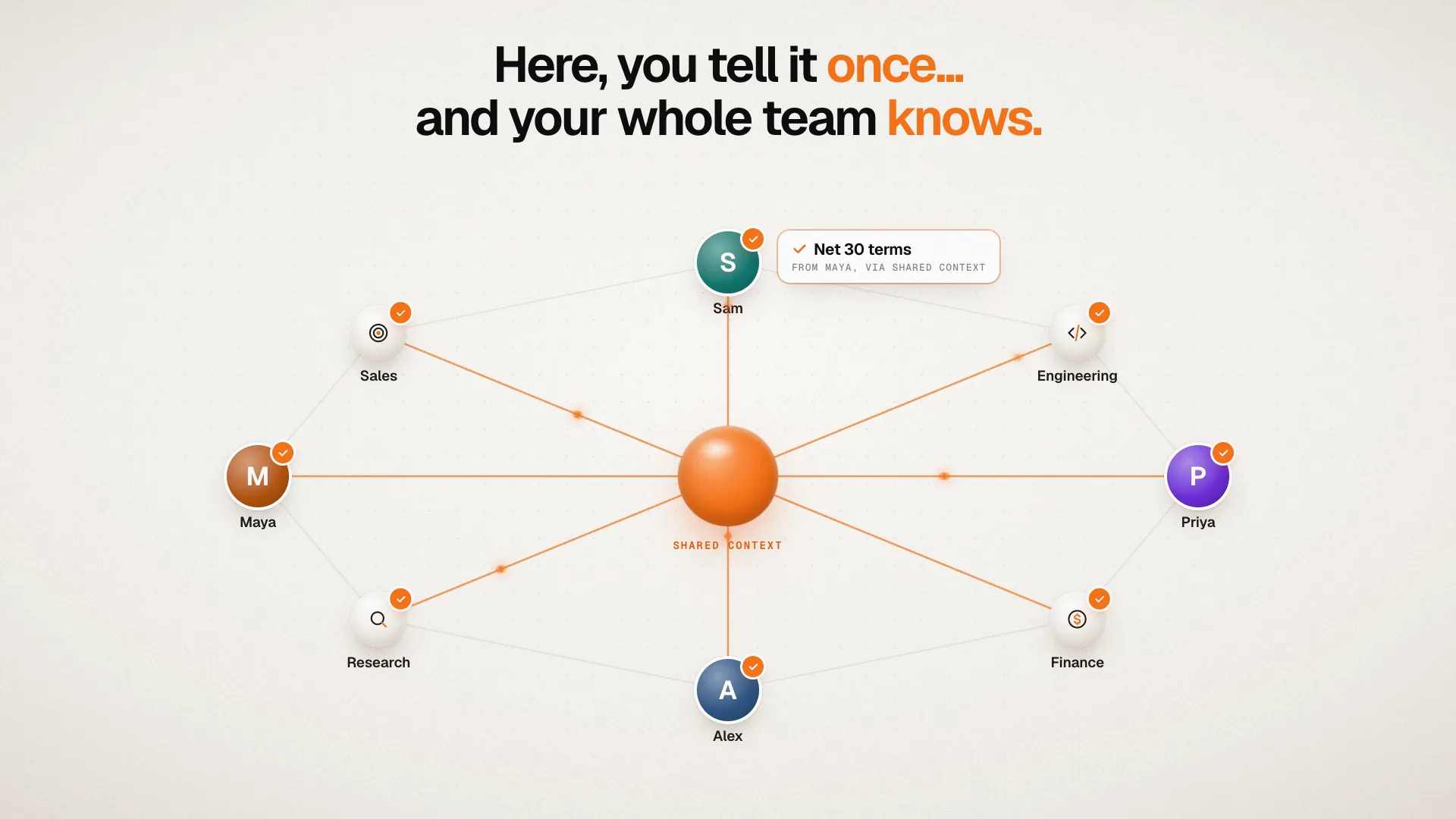
- Here, you tell it once… and your whole team knows.
- Shared when it’s for the team. Private when it’s just for you.
- And every task shows its cost, before it runs.
- At first, you approve every move.
- Over time, it asks less… and does more.
- Big moves. Without the heavy lifting.
- orbo.work. Everyone… gets a team.
Every week, something falls through the cracks.
It all lands on the same few people, and your AI tools only help when someone stops to ask.
Action items get lost after the call.
Everyone leaves the meeting with a to-do. By Friday, nobody remembers who said they’d do what.
Your AI sits idle until you ask.
It can do a lot, but someone still has to spot the work, write the prompt, and chase it to done.
You repeat yourself to every AI.
What you tell your AI stays in your account. Your teammate’s AI starts from zero.
You don’t prompt it. You manage it.
It runs the ongoing work of your company. Work comes in, becomes a task, and goes to whoever should do it.
Work comes in.
Ask it in chat, forward an email, or bring it into a Google Meet call, where anyone can ask it a question out loud. Or don’t ask at all: after the call, it reads the transcript and suggests the follow-ups.
It becomes a task.
Every request and action item becomes a task with a priority. The Chief of Staff hands out the work and follows up on anything that stalls.
The right person or agent does it.
Each task goes to a teammate or to an agent in the right role. If nobody fits, it proposes a new agent for you to approve.
Pick a role. Or write your own.
Every agent works in a role: what it does, and the tools it needs to do it. Start from a ready-made one, or describe a job only your company has.
Chief of Staff
Every company starts with one. It turns what you ask into tasks, hands each to the right agent or teammate, and follows up on anything that stalls.
More about Chief of Staff
Sales follow-up
Spots a quote that went quiet, reads the thread, and drafts a short follow-up in your company’s voice, for your OK.
More about Sales follow-upInbox and support
Sorts a shared inbox, answers routine questions from what your company knows, and brings anything that commits you, like a refund, to a person.
More about Inbox and supportCoding
Changes code in your GitHub repository, runs the tests, and opens a pull request for review.
Reviewer
Checks another agent’s work against the task’s goal and evidence before it leaves the company, and hands it back when something is wrong.
Content
Writes pages, posts and announcements in your company’s voice, using only the facts your company gave it.
Research
Answers a question from sources it can name, says where every fact came from, and tells you when sources disagree.
Website work
Works inside a website your company has an account on, and brings back what the task needs, with the page it read it from.
Weekly update
Writes your regular update on a schedule, from finished work, and says plainly what it couldn’t read.
Build watch
Watches your builds and pull requests, fixes what the failure itself shows, and never skips a test to make a build pass.
Your own role
Describe a job only your company has, in plain words, or copy one of ours and change it. When no agent fits a task, the Chief of Staff proposes a new one for your OK.
Every agent gets its own computer.
So it doesn’t just talk about the work. It does it: every task runs on a fresh, isolated computer with the apps and logins the job needs.
Isolated for every task
Each task runs in a fresh sandbox that is closed when the work is done.
Its own apps and logins
Browser, email, calendar, GitHub and meetings, signed in with the logins you give it.
Watch it live, or take over
See the agent’s browser as it works, and step in whenever you want.
Proof you can open
Every email it sends keeps its message ID, and code arrives as a pull request. Not just an agent saying “done.”
Tell it once. Your whole team knows.
Most AI keeps each person’s context locked in their own account. On orbo.work everyone keeps their own login, but what one person tells it, the whole team’s agents know.
Maya says it once. Sam’s agent drafts the quote with Net 30 already in it.
Private chats stay private.
At first, you approve every move.
Over time, it asks less and does more. Like a new hire, it earns more freedom as it proves itself.
You approve what leaves the company
Emails, messages and outside changes wait for a person’s OK. A separate service, not the agent, carries them out.
Your rules, per project
Decide who approves what in each project, and set limits, like only emailing certain people.
Freedom it earns
After about ten approvals of one kind of action, half with a real result and none corrected, it offers to stop asking. You can always take that back.
An assistant helps one person. orbo.work works for the whole company.
| Compared on | A personal AI assistant |  orbo.work orbo.work |
|---|---|---|
| Who it works for | One person, in their own account | The whole company, sharing what the team knows |
| How work starts | Someone has to ask | It picks up work from meetings and email, before anyone asks |
| How work gets done | It drafts, and you do the rest | Agents do it on their own computers, with their own logins |
| Proof | It tells you it’s done | A receipt you can open: the sent email, the pull request |
| Control | Fixed settings | It asks first, then earns more freedom |
Questions, answered.
What is orbo.work?
orbo.work is a proactive AI team for companies. It is set up like an org chart: a Chief of Staff and AI agents in roles across the business. It picks up work from meetings, email and chat, hands each task to the right person or agent, and each agent does the work on a computer of its own.
How is it different from ChatGPT or Copilot?
Those are personal assistants: you have to ask them, and they only know what you told them. orbo.work works for the whole team. What one person tells it, everyone’s agents know, and each agent has its own computer and logins, so it can send the email or update the system, not just write a draft.
Who is orbo.work for?
Founder-led companies, where follow-ups from meetings, emails that need answers and promises to clients all land on one or two people. It grows with the company: more people, more agents and more permissions.
What can the agents do?
Each agent works in a role, like Sales follow-up, Inbox and support, Coding, Reviewer, Content or Research. With the logins you give it, it can use a browser, email, calendar, GitHub and meetings: chase a quote that went quiet, answer routine questions, open a pull request, or answer a question and name its sources.
Can it join my meetings?
Yes. Bring it into a Google Meet call and anyone on the call can ask it a question out loud, like “Hey Orbo, what did we decide about the launch date?” After the call it reads the transcript and suggests follow-up tasks. Anything it wants to change waits for approval in Chat first.
Will it act without my approval?
Not at first. Emails, messages and changes outside the company wait for a person’s OK, and you decide who approves what in each project. Once it has proven itself on one kind of action, it offers to stop asking, and you can always take that back.
Is it safe to give an agent my logins?
Each task runs on a fresh, isolated computer that is closed when the work is done. You can watch the agent’s browser live and take over at any time, and anything that leaves the company waits for a person’s OK. A separate service, not the agent, carries it out.
Does the whole team see everything I tell it?
No. What you share with the team is known to the team, so nobody has to repeat it. Private chats stay private.
How do I get access?
orbo.work is live and invite-only while we bring in our first design partners. Join the waitlist and we’ll be in touch about access.
Does it work on my phone?
Yes. Install orbo.work from your browser to check live work, send new work and answer approvals from your phone.
Who makes orbo.work?
Orbo Technologies. Its four founders met at the University of Manchester, all write product code, and run their own company on orbo.work every day.
Big moves. Without the heavy lifting.
Everyone gets a team.
Join the waitlist and we’ll be in touch about access.